Para esos curiosos, esto es lo que trae la versión del esquema 52 (Windows Server 8 Consumer Preview).
ldapDisplayName: msDS-MembersOfResourcePropertyList
adminDescription: For a resource property list object, this multi-valued link attribute points to one or more resource property objects.
ldapDisplayName: msDS-MembersOfResourcePropertyListBL
adminDescription: Backlink for ms-DS-Members-Of-Resource-Property-List. For a resource property object, this attribute references the resource property list object that it is a member of.
ldapDisplayName: msDS-ClaimValueType
adminDescription: For a claim type object, specifies the value type of the claims issued.
ldapDisplayName: msDS-ClaimPossibleValues
adminDescription: For a claim type or resource property object, this attribute describes the values suggested to a user when the he/she use the claim type or resource property in applications.
ldapDisplayName: msDS-ClaimAttributeSource
adminDescription: For a claim type object, this attribute points to the attribute that will be used as the source for the claim type.
ldapDisplayName: msDS-ClaimTypeAppliesToClass
adminDescription: For a claim type object, this linked attribute points to the AD security principal classes that for which claims should be issued. (For example, a link to the user class).
ldapDisplayName: msDS-ClaimSharesPossibleValuesWith
adminDescription: For a resource property object, this attribute indicates that the suggested values of the claims issued are defined on the object that this linked attribute points to. Overrides ms-DS-Claim-Possible-Values on itself, if populated.
ldapDisplayName: msDS-ClaimSharesPossibleValuesWithBL
adminDescription: For a claim type object, this attribute indicates that the possible values described in ms-DS-Claim-Possible-Values are being referenced by other claim type objects.
ldapDisplayName: msDS-IsUsedAsResourceSecurityAttribute
adminDescription: For a resource property, this attribute indicates whether it is being used as a secure attribute.
ldapDisplayName: msSPP-KMSIds
adminDescription: KMS IDs enabled by the Activation Object
ldapDisplayName: msSPP-CSVLKPid
adminDescription: ID of CSVLK product-key used to create the Activation Object
ldapDisplayName: msSPP-CSVLKSkuId
adminDescription: SKU ID of CSVLK product-key used to create the Activation Object
ldapDisplayName: msSPP-PhoneLicense
adminDescription: License used during phone activation of the Active Directory forest
ldapDisplayName: msSPP-ConfigLicense
adminDescription: Product-key configuration license used during online/phone activation of the Active Directory forest
ldapDisplayName: msSPP-OnlineLicense
adminDescription: License used during online activation of the Active Directory forest
ldapDisplayName: msSPP-ConfirmationId
adminDescription: Confirmation ID (CID) used for phone activation of the Active Directory forest
ldapDisplayName: msSPP-InstallationId
adminDescription: Installation ID (IID) used for phone activation of the Active Directory forest
ldapDisplayName: msSPP-IssuanceLicense
adminDescription: Issuance license used during online/phone activation of the Active Directory forest
ldapDisplayName: msSPP-CSVLKPartialProductKey
adminDescription: Last 5 characters of CSVLK product-key used to create the Activation Object
ldapDisplayName: msTPM-SrkPubThumbprint
adminDescription: This attribute contains the thumbprint of the SrkPub corresponding to a particular TPM. This helps to index the TPM devices in the directory.
ldapDisplayName: msTPM-OwnerInformationTemp
adminDescription: This attribute contains temporary owner information for a particular TPM.
ldapDisplayName: msTPM-TpmInformationForComputer
adminDescription: This attribute links a Computer object to a TPM object.
ldapDisplayName: msTPM-TpmInformationForComputerBL
adminDescription: This attribute links a TPM object to the Computer objects associated with it.
ldapDisplayName: msDS-ClaimTypes
adminDescription: A container of this class can contain claim type objects.
ldapDisplayName: msDS-ResourcePropertyList
adminDescription: An object of this class contains a list of resource properties.
ldapDisplayName: msDS-ResourceProperties
adminDescription: A container of this class can contain resource properties.
ldapDisplayName: msDS-ClaimTypePropertyBase
adminDescription: An abstract class that defines the base class for claim type or resource property classes.
ldapDisplayName: msDS-ResourceProperty
adminDescription: An instance of this class holds the definition of a property on resources.
ldapDisplayName: msDS-ClaimType
adminDescription: An instance of this class holds the definition of a claim type that can be defined on security principals.
ldapDisplayName: msSPP-ActivationObjectsContainer
adminDescription: Container for Activation Objects used by Active Directory based activation
ldapDisplayName: msSPP-ActivationObject
adminDescription: Activation Object used in Active Directory based activation
ldapDisplayName: msTPM-InformationObjectsContainer
adminDescription: Container for TPM objects.
ldapDisplayName: msTPM-InformationObject
adminDescription: This class contains recovery information for a Trusted Platform Module (TPM) device.
ldapDisplayName: msDNS-IsSigned
adminDescription: An attribute used to define whether or not the DNS zone is signed.
ldapDisplayName: msDNS-NSEC3OptOut
adminDescription: An attribute used to define whether or not the DNS zone should be signed using NSEC opt-out.
ldapDisplayName: msDNS-SigningKeys
adminDescription: An attribute that contains the set of encrypted DNSSEC signing keys used by the DNS server to sign the DNS zone.
ldapDisplayName: msDNS-SignWithNSEC3
adminDescription: An attribute used to define whether or not the DNS zone is signed with NSEC3.
ldapDisplayName: msDNS-NSEC3UserSalt
adminDescription: An attribute that defines a user-specified NSEC3 salt string to use when signing the DNS zone. If empty, random salt will be used.
ldapDisplayName: msDNS-DNSKEYRecords
adminDescription: An attribute that contains the DNSKEY record set for the root of the DNS zone and the root key signing key signature records.
ldapDisplayName: msDNS-DSRecordSetTTL
adminDescription: An attribute that defines the time-to-live (TTL) value assigned to DS records when signing the DNS zone.
ldapDisplayName: msDNS-KeymasterZones
adminDescription: A list of Active Directory-integrated zones for which the DNS server is the keymaster.
ldapDisplayName: msDNS-NSEC3Iterations
adminDescription: An attribute that defines how many NSEC3 hash iterations to perform when signing the DNS zone.
ldapDisplayName: msDNS-PropagationTime
adminDescription: An attribute used to define in seconds the expected time required to propagate zone changes through Active Directory.
ldapDisplayName: msDNS-NSEC3CurrentSalt
adminDescription: An attribute that defines the current NSEC3 salt string being used to sign the DNS zone.
ldapDisplayName: msDNS-RFC5011KeyRollovers
adminDescription: An attribute that defines whether or not the DNS zone should be maintained using key rollover procedures defined in RFC 5011.
ldapDisplayName: msDNS-NSEC3HashAlgorithm
adminDescription: An attribute that defines the NSEC3 hash algorithm to use when signing the DNS zone.
ldapDisplayName: msDNS-DSRecordAlgorithms
adminDescription: An attribute used to define the algorithms used when writing the dsset file during zone signing.
ldapDisplayName: msDNS-DNSKEYRecordSetTTL
adminDescription: An attribute that defines the time-to-live (TTL) value assigned to DNSKEY records when signing the DNS zone.
ldapDisplayName: msDNS-MaintainTrustAnchor
adminDescription: An attribute used to define the type of trust anchor to automatically publish in the forest-wide trust anchor store when the DNS zone is signed.
ldapDisplayName: msDNS-NSEC3RandomSaltLength
adminDescription: An attribute that defines the length in bytes of the random salt used when signing the DNS zone.
ldapDisplayName: msDNS-SigningKeyDescriptors
adminDescription: An attribute that contains the set of DNSSEC Signing Key Descriptors (SKDs) used by the DNS server to generate keys and sign the DNS zone.
ldapDisplayName: msDNS-SignatureInceptionOffset
adminDescription: An attribute that defines in seconds how far in the past DNSSEC signature validity periods should begin when signing the DNS zone.
ldapDisplayName: msDNS-ParentHasSecureDelegation
adminDescription: An attribute used to define whether the parental delegation to the DNS zone is secure.
ldapDisplayName: msDNS-SecureDelegationPollingPeriod
adminDescription: An attribute that defines in seconds the time between polling attempts for child zone key rollovers.
ldapDisplayName: msAuthz-MemberRulesInCentralAccessPolicy
adminDescription: For a central access policy, this attribute identifies the central access rules that comprise the policy.
ldapDisplayName: msAuthz-MemberRulesInCentralAccessPolicyBL
adminDescription: Backlink for ms-Authz-Member-Rules-In-Central-Access-Policy. For a central access rule object, this attribute references one or more central access policies that point to it.
ldapDisplayName: msDS-ClaimSource
adminDescription: For a claim type, this attribute indicates the source of the claim type. For example, the source can be certificate.
ldapDisplayName: msAuthz-ProposedSecurityPolicy
adminDescription: For a Central Access Policy Entry, defines the proposed security policy of the objects the CAPE is applied to.
ldapDisplayName: msDS-ClaimSourceType
adminDescription: For a security principal claim type, lists the type of store the issued claim is sourced from
ldapDisplayName: msAuthz-EffectiveSecurityPolicy
adminDescription: For a central access rule, this attribute defines the permission that is applying to the target resources on the central access rule.
ldapDisplayName: msDS-ClaimIsSingleValued
adminDescription: For a claim type object, this attribute identifies if the claim type or resource property can only contain single value.
ldapDisplayName: msAuthz-LastEffectiveSecurityPolicy
adminDescription: For a Central Access Policy Entry, defines the security policy that was last applied to the objects the CAPE is applied to.
ldapDisplayName: msAuthz-ResourceCondition
adminDescription: For a central access rule, this attribute is an expression that identifies the scope of the target resource to which the policy applies.
ldapDisplayName: msDS-ClaimIsValueSpaceRestricted
adminDescription: For a claim type, this attribute identifies whether a user can input values other than those described in the msDS-ClaimPossibleValues in applications.
ldapDisplayName: msAuthz-CentralAccessPolicyID
adminDescription: For a Central Access Policy, this attribute defines a GUID that can be used to identify the set of policies when applied to a resource.
ldapDisplayName: msDS-GenerationId
adminDescription: For virtual machine snapshot resuming detection. This attribute represents the VM Generation ID.
replace: adminDescription
adminDescription: For a claim type object, indicates that the possible values of the claims issued are defined on the object this linked attribute points to; overrides msDS-ClaimPossibleValues, msDS-ClaimValueType, and msDS-ClaimIsValueSpaceRestricted, if populated.
ldapDisplayName: msDNS-ServerSettings
adminDescription: A container for storing DNS server settings.
ldapDisplayName: msAuthz-CentralAccessPolicies
adminDescription: A container of this class can contain Central Access Policy objects.
ldapDisplayName: msAuthz-CentralAccessRules
adminDescription: A container of this class can contain Central Access Policy Entry objects.
ldapDisplayName: msAuthz-CentralAccessRule
adminDescription: A class that defines Central Access Rules used to construct a central access policy.
ldapDisplayName: msAuthz-CentralAccessPolicy
adminDescription: A class that defines Central Access Policy objects.
ldapDisplayName: msDS-AllowedToActOnBehalfOfOtherIdentity
adminDescription: This attribute is used for access checks to determine if a requestor has permission to act on the behalf of other identities to services running as this account.
ldapDisplayName: msKds-Version
adminDescription: Version number of this root key.
ldapDisplayName: msKds-DomainID
adminDescription: Distinguished name of the Domain Controller which generated this root key.
ldapDisplayName: msKds-KDFParam
adminDescription: Parameters for the key derivation algorithm.
ldapDisplayName: msKds-CreateTime
adminDescription: The time when this root key was created.
ldapDisplayName: msKds-RootKeyData
adminDescription: Root key.
ldapDisplayName: msDS-PrimaryComputer
adminDescription: For a user or group object, identifies the primary computers.
ldapDisplayName: msKds-UseStartTime
adminDescription: The time after which this root key may be used.
ldapDisplayName: msImaging-HashAlgorithm
adminDescription: Contains the name of the hash algorithm used to create the Thumbprint Hash for the Scan Repository/Secure Print Device.
ldapDisplayName: msKds-KDFAlgorithmID
adminDescription: The algorithm name of the key derivation function used to compute keys.
ldapDisplayName: msImaging-ThumbprintHash
adminDescription: Contains a hash of the security certificate for the Scan Repository/Secure Print Device.
ldapDisplayName: msKds-PublicKeyLength
adminDescription: The length of the secret agreement public key.
ldapDisplayName: msKds-PrivateKeyLength
adminDescription: The length of the secret agreement private key.
ldapDisplayName: msDS-IsPrimaryComputerFor
adminDescription: Backlink atribute for msDS-IsPrimaryComputer.
ldapDisplayName: msKds-SecretAgreementParam
adminDescription: The parameters for the secret agreement algorithm.
ldapDisplayName: msKds-SecretAgreementAlgorithmID
adminDescription: The name of the secret agreement algorithm to be used with public keys.
ldapDisplayName: msDS-ValueTypeReference
adminDescription: This attribute is used to link a resource property object to its value type.
ldapDisplayName: msDS-ValueTypeReferenceBL
adminDescription: This is the back link for ms-DS-Value-Type-Reference. It links a value type object back to resource properties.
ldapDisplayName: msDS-IsPossibleValuesPresent
adminDescription: This attribute identifies if ms-DS-Claim-Possible-Values on linked resource property must have value or must not have value.
ldapDisplayName: msKds-ProvRootKey
adminDescription: Root keys for the Group Key Distribution Service.
ldapDisplayName: msKds-ProvServerConfiguration
adminDescription: Configuration for the Group Key Distribution Service.
ldapDisplayName: msDS-ValueType
adminDescription: An value type object holds value type information for a resource property.
ldapDisplayName: msDS-TransformationRules
adminDescription: Specifies the Transformation Rules for Cross-Forest Claims Transformation.
ldapDisplayName: msDS-AppliesToResourceTypes
adminDescription: For a resource property, this attribute indicates what resource types this resource property applies to.
ldapDisplayName: msDS-TransformationRulesCompiled
adminDescription: Blob containing compiled transformation rules.
ldapDisplayName: msDS-EgressClaimsTransformationPolicy
adminDescription: This is a link to a Claims Transformation Policy Object for the egress claims (claims leaving this forest) to the Trusted Domain. This is applicable only for an incoming or bidirectional Cross-Forest Trust. When this link is not present, all claims are allowed to egress as-is.
ldapDisplayName: msDS-IngressClaimsTransformationPolicy
adminDescription: This is a link to a Claims Transformation Policy Object for the ingress claims (claims entering this forest) from the Trusted Domain. This is applicable only for an outgoing or bidirectional Cross-Forest Trust. If this link is absent, all the ingress claims are dropped.
ldapDisplayName: msDS-TDOEgressBL
adminDescription: Backlink to TDO Egress rules link on object.
ldapDisplayName: msDS-TDOIngressBL
adminDescription: Backlink to TDO Ingress rules link on object.
ldapDisplayName: msDS-ManagedPassword
adminDescription: This attribute is the managed password data for a group MSA.
ldapDisplayName: msDS-ManagedPasswordId
adminDescription: This attribute is the identifier for the current managed password data for a group MSA.
ldapDisplayName: msDS-GroupMSAMembership
adminDescription: This attribute is used for access checks to determine if a requestor has permission to retrieve the password for a group MSA.
ldapDisplayName: msDS-GeoCoordinatesAltitude
adminDescription: ms-DS-GeoCoordinates-Altitude
ldapDisplayName: msDS-GeoCoordinatesLatitude
adminDescription: ms-DS-GeoCoordinates-Latitude
ldapDisplayName: msDS-GeoCoordinatesLongitude
adminDescription: ms-DS-GeoCoordinates-Longitude
ldapDisplayName: msDS-ManagedPasswordInterval
adminDescription: This attribute is used to retrieve the number of days before a managed password is automatically changed for a group MSA.
ldapDisplayName: msDS-ManagedPasswordPreviousId
adminDescription: This attribute is the identifier for the previous managed password data for a group MSA.
ldapDisplayName: msDS-ClaimsTransformationPolicies
adminDescription: An object of this class holds the one set of Claims Transformation Policy for Cross-Forest Claims Transformation.
ldapDisplayName: msDS-ClaimsTransformationPolicyType
adminDescription: An object of this class holds the one set of Claims Transformation Policy for Cross-Forest Claims Transformation.
ldapDisplayName: msDS-GroupManagedServiceAccount
adminDescription: The group managed service account class is used to create an account which can be shared by different computers to run Windows services.
ldapDisplayName: msDS-RIDPoolAllocationEnabled
adminDescription: This attribute indicates whether RID pool allocation is enabled or not.
ldapDisplayName: netbootDUID
adminDescription: This attribute is used to store DHCPv6 DUID device ID.
lDAPDisplayName: msDS-cloudExtensionAttribute1
adminDescription: An attribute used to house an arbitrary cloud-relevant string
lDAPDisplayName: msDS-cloudExtensionAttribute2
adminDescription: An attribute used to house an arbitrary cloud-relevant string
lDAPDisplayName: msDS-cloudExtensionAttribute3
adminDescription: An attribute used to house an arbitrary cloud-relevant string
lDAPDisplayName: msDS-cloudExtensionAttribute4
adminDescription: An attribute used to house an arbitrary cloud-relevant string
lDAPDisplayName: msDS-cloudExtensionAttribute5
adminDescription: An attribute used to house an arbitrary cloud-relevant string
lDAPDisplayName: msDS-cloudExtensionAttribute6
adminDescription: An attribute used to house an arbitrary cloud-relevant string
lDAPDisplayName: msDS-cloudExtensionAttribute7
adminDescription: An attribute used to house an arbitrary cloud-relevant string
lDAPDisplayName: msDS-cloudExtensionAttribute8
adminDescription: An attribute used to house an arbitrary cloud-relevant string
lDAPDisplayName: msDS-cloudExtensionAttribute9
adminDescription: An attribute used to house an arbitrary cloud-relevant string
lDAPDisplayName: msDS-cloudExtensionAttribute10
adminDescription: An attribute used to house an arbitrary cloud-relevant string
lDAPDisplayName: msDS-cloudExtensionAttribute11
adminDescription: An attribute used to house an arbitrary cloud-relevant string
lDAPDisplayName: msDS-cloudExtensionAttribute12
adminDescription: An attribute used to house an arbitrary cloud-relevant string
lDAPDisplayName: msDS-cloudExtensionAttribute13
adminDescription: An attribute used to house an arbitrary cloud-relevant string
lDAPDisplayName: msDS-cloudExtensionAttribute14
adminDescription: An attribute used to house an arbitrary cloud-relevant string
lDAPDisplayName: msDS-cloudExtensionAttribute15
adminDescription: An attribute used to house an arbitrary cloud-relevant string
lDAPDisplayName: msDS-cloudExtensionAttribute16
adminDescription: An attribute used to house an arbitrary cloud-relevant string
lDAPDisplayName: msDS-cloudExtensionAttribute17
adminDescription: An attribute used to house an arbitrary cloud-relevant string
lDAPDisplayName: msDS-cloudExtensionAttribute18
adminDescription: An attribute used to house an arbitrary cloud-relevant string
lDAPDisplayName: msDS-cloudExtensionAttribute19
adminDescription: An attribute used to house an arbitrary cloud-relevant string
lDAPDisplayName: msDS-cloudExtensionAttribute20
adminDescription: An attribute used to house an arbitrary cloud-relevant string
ldapDisplayName: msDS-CloudExtensions
adminDescription: A collection of attributes used to house arbitrary cloud-relevant strings
Interesante como se ven cosas relacionadas a la nube…
June 13, 2013


Sobre las bitácoras de Exchange.
Sabias que referente a las bitácoras de envío/recepción de correo en Microsoft Exchange Server existen limites de retención basados en la fecha de creación así como tamaño máximo de los archivos y de la carpeta que los contiene?
Es una omisión muy común el únicamente configurar tu servidor para que mantenga las bitácoras por un tiempo determinado, obviando los otros dos puntos anteriores.
Claro, todo va a funcionar perfecto hasta que nuestro jefe nos pida rastrear aquel correo de vida a muerte y kabum…
Estos parámetros los podemos manejar con el siguiente cmdlet:
Set-TransportServer -Identity SYS-EXHT-01 -SendProtocolLogMaxDirectorySize 1073741824 -ReceiveProtocolLogMaxDirectorySize 5368709120 -ReceiveProtocolLogMaxFileSize 26214400
En este ejemplo estamos estableciendo los limites de los archivos y las carpetas que los contienen.
Desde luego estos parámetros van a variar en cada ambiente, los parámetros apropiados solo usted los podrá determinar.
Recordemos que los valores deben ingresarse en bytes.
Y como cualquier cambio referente al servicio de transporte este deberá reiniciarse para que estos tomen efecto.
Además, si lo que se desea es mantener registros de aquellos mensajes enviados por algún aplicativo a través de un conector entonces deberá habilitarse el registro a nivel de SMTP.
Hasta pronto y gracias por su tiempo.
Es una omisión muy común el únicamente configurar tu servidor para que mantenga las bitácoras por un tiempo determinado, obviando los otros dos puntos anteriores.
Claro, todo va a funcionar perfecto hasta que nuestro jefe nos pida rastrear aquel correo de vida a muerte y kabum…
Estos parámetros los podemos manejar con el siguiente cmdlet:
Set-TransportServer -Identity SYS-EXHT-01 -SendProtocolLogMaxDirectorySize 1073741824 -ReceiveProtocolLogMaxDirectorySize 5368709120 -ReceiveProtocolLogMaxFileSize 26214400
En este ejemplo estamos estableciendo los limites de los archivos y las carpetas que los contienen.
Desde luego estos parámetros van a variar en cada ambiente, los parámetros apropiados solo usted los podrá determinar.
Recordemos que los valores deben ingresarse en bytes.
Y como cualquier cambio referente al servicio de transporte este deberá reiniciarse para que estos tomen efecto.
Además, si lo que se desea es mantener registros de aquellos mensajes enviados por algún aplicativo a través de un conector entonces deberá habilitarse el registro a nivel de SMTP.
Hasta pronto y gracias por su tiempo.
Delegación para desbloqueo de cuentas y cambio de contraseñas.
Este pequeño artículo trata explícitamente sobre como delegar un OU o bien un dominio para que un grupo determinado pueda restablecer contraseñas y desbloquear cuentas de usuario
1- Seleccione el OU a delegar, clic derecho “Delegar Control”

2- Agregue el o los grupos que desea delegar. Recuerden que las mejores practicas indican brindar permisos a grupos y no entes individuales.

3- Esta asistente ya tiene ciertas delegaciones predefinidas que les pueden ser útiles, como ven en este ejemplo estoy utilizando la opción de restablecer contraseñas e indicar si estas deben cambiarse en el próximo inicio de sesion.

4- A continuación podrá confirmar su operación antes de ejecutar los cambios.

5- De nuevo navegue a las propiedades del OU que esta delegando, recuerde que las opciones de vista avanzada deben estar habilitadas para poder ver todas las etiquetas correspondientes.
6- Diríjase a las opciones “Avanzadas”.

7- Presione agregar, esto pues debemos delegar permisos sobre un atributo mas.
8- Ahora seleccione la etiqueta de “Propiedades”.
9- En la sección de “Aplica A” selecciones los objetos tipo usuario descendientes.

10- Seleccione la opción de “Permitir” lo siguiente “Leer lockoutTime” y “Escribir lockoutTime”.
11- Si gustan que por ejemplo también se pueda manipular si la contraseña expira o no, si el usuario puede o no cambiarla entonces aplique estos mismos permisos al atributo “userAccountControl”
Excelente, esto es todo lo que necesitamos para este escenario.
Hasta pronto.
1- Seleccione el OU a delegar, clic derecho “Delegar Control”

2- Agregue el o los grupos que desea delegar. Recuerden que las mejores practicas indican brindar permisos a grupos y no entes individuales.

3- Esta asistente ya tiene ciertas delegaciones predefinidas que les pueden ser útiles, como ven en este ejemplo estoy utilizando la opción de restablecer contraseñas e indicar si estas deben cambiarse en el próximo inicio de sesion.

4- A continuación podrá confirmar su operación antes de ejecutar los cambios.

5- De nuevo navegue a las propiedades del OU que esta delegando, recuerde que las opciones de vista avanzada deben estar habilitadas para poder ver todas las etiquetas correspondientes.
6- Diríjase a las opciones “Avanzadas”.

7- Presione agregar, esto pues debemos delegar permisos sobre un atributo mas.
8- Ahora seleccione la etiqueta de “Propiedades”.
9- En la sección de “Aplica A” selecciones los objetos tipo usuario descendientes.

10- Seleccione la opción de “Permitir” lo siguiente “Leer lockoutTime” y “Escribir lockoutTime”.
11- Si gustan que por ejemplo también se pueda manipular si la contraseña expira o no, si el usuario puede o no cambiarla entonces aplique estos mismos permisos al atributo “userAccountControl”
Excelente, esto es todo lo que necesitamos para este escenario.
Hasta pronto.
Truco rápido de DNSCMD.
Hace unos días encontré un caso donde necesitaba agregar un nuevo servidor de nombres a una lista de zonas DNS, por lo que pensé que lo podía hacer con mi amigo DNSCMD.
Realmente me tomo mas tiempo del que creí pues no lograba lo que necesitaba hasta que luego de leer mucha documentación me di cuenta que necesitaba una @ en mi comando.
for /f %a in (zoneList.txt) do dnscmd /recordadd %a @ NS serverName.sysadmin-cr.com /f
El comando anterior leerá una lista de zonas (que también obtuve con este comando) y agregara a serverName.sysadmin-cr.com como un Name Server para esta zona.
Que fácil, no?!
Realmente me tomo mas tiempo del que creí pues no lograba lo que necesitaba hasta que luego de leer mucha documentación me di cuenta que necesitaba una @ en mi comando.
for /f %a in (zoneList.txt) do dnscmd /recordadd %a @ NS serverName.sysadmin-cr.com /f
El comando anterior leerá una lista de zonas (que también obtuve con este comando) y agregara a serverName.sysadmin-cr.com como un Name Server para esta zona.
Que fácil, no?!
July 17, 2012
http://sysadmin-cr.com
Ya
visitaste nuestro nuevo sitio? Ahora sumado a todo lo de Active Directory y
Exchange también tenemos temas de MOSS, TMG y mucho mas scripting, hasta OpenSource! Los
esperamos.
http://sysadmin-cr.com/
June 05, 2012
Nuevo sitio! http://sysadmin-cr.com
Por mucho
tiempo me dedique o al menos intente en mi antiguo trabajo a ayudar a otros,
responder preguntas posteadas en foros internos, documentar formas de
solucionar problemas en general, compartir información. Luego me di cuenta cuan
difícil es a veces encontrar información en Español, por lo cual un día me decidí
a tener mi propio blog y pues desde ahí tratar de contribuir con la comunidad
de informáticos.
No es fácil, pues el lenguaje coloquial local y otros hacen que escribir unas cuantas líneas sea todo un reto, si es que realmente quieres llegar a una audiencia amplia… pero creo por la cantidad y localización de los visitantes en mi blog pues que de alguna u otra forma lo he logrado o bien los motores de búsqueda me han favorecido y de forma equivoca han enviado cibernautas hasta mi.
Bueno, ya hace un tiempo junto con un grupo de buenos amigos nos decidimos por crear un grupo de informáticos, con conocimientos, experiencias y enfoques muy variados, hoy tengo el gusto de fusionar mi blog con el de ellos para así tener la información centralizada.
Agradezco a todos aquellos que tomaron algo de su valioso tiempo para leer mis artículos y realmente espero les hayan sido de provecho. Espero poder contar con ustedes en mi nuevo hogar cibernético en http://sysadmin-cr.com/
Ahí encontraran contenido mixto, pues nuestras áreas de enfoque son las mismas, aunque al final, todos vivimos la cultura geek.
Gracias y hasta pronto!

No es fácil, pues el lenguaje coloquial local y otros hacen que escribir unas cuantas líneas sea todo un reto, si es que realmente quieres llegar a una audiencia amplia… pero creo por la cantidad y localización de los visitantes en mi blog pues que de alguna u otra forma lo he logrado o bien los motores de búsqueda me han favorecido y de forma equivoca han enviado cibernautas hasta mi.
Bueno, ya hace un tiempo junto con un grupo de buenos amigos nos decidimos por crear un grupo de informáticos, con conocimientos, experiencias y enfoques muy variados, hoy tengo el gusto de fusionar mi blog con el de ellos para así tener la información centralizada.
Agradezco a todos aquellos que tomaron algo de su valioso tiempo para leer mis artículos y realmente espero les hayan sido de provecho. Espero poder contar con ustedes en mi nuevo hogar cibernético en http://sysadmin-cr.com/
Ahí encontraran contenido mixto, pues nuestras áreas de enfoque son las mismas, aunque al final, todos vivimos la cultura geek.
Gracias y hasta pronto!

April 03, 2012
Registros SPF.
Algunas veces en la lucha continua contra el spam caemos en otros problemas, como los de los registros SPF.
A grandes rasgos lo que hace el registro SPF es establecer quien envía correos desde un determinado domino. No nos compliquemos, la forma mas simple y eficaz de crearlos es http://www.microsoft.com/mscorp/safety/content/technologies/senderid/wizard/
Recuerda que aunque tengas varios servidores que envían correo, solo necesitas un registro.
Este registro puede ser validado en http://www.kitterman.com/spf/validate.html
Hasta pronto mis estimados.
A grandes rasgos lo que hace el registro SPF es establecer quien envía correos desde un determinado domino. No nos compliquemos, la forma mas simple y eficaz de crearlos es http://www.microsoft.com/mscorp/safety/content/technologies/senderid/wizard/
Recuerda que aunque tengas varios servidores que envían correo, solo necesitas un registro.
Este registro puede ser validado en http://www.kitterman.com/spf/validate.html
Hasta pronto mis estimados.
March 22, 2012
AD Recycle Bin UI
Y bien
continuando con la tendencia que hemos visto en Windows Server 8 Beta pues les
comento que también para el AD Recycle Bin se a creado una interfaz grafica.
Desde el
mismo Active Directory Administrative Center se puede navegar al contenedor de
objetos borrados.
Algo que me
gusta mucho es que en la vista por defecto puedes mirar los objetos basados en
su ultimo contenedor padre.

En las
opciones de recuperación podemos también establecer un nuevo contenedor padre,
excelente eso!

Bueno,
adelante, a explorar Server 8 amigos!
March 21, 2012
Un buen blog.
Estimados cibernautas, si gustan leer algo mas, en Español desde luego, pues acá les dejo el hipervínculo para el blog de un buen amigo mio http://blogs.itpro.es/jimcesse
Jimcesse, espero ver el articulo del scanvenger!
Jimcesse, espero ver el articulo del scanvenger!
SID?!?
Constantemente escuchamos términos curiosos en esto de la informática e inclusive inventamos palabras o verbos. Hoy vamos a ver un poco eso de los SID (Como me gustaría a mi ser un Lord Sid)..
Antes que nada hablemos un poco de los “security principals”. En un entorno Windows esto es una entidad que se puede identificar de manera única y que necesitan acceso a algún recurso regido por una autoridad de seguridad (en este caso los controladores de domino o el SAM).
Perfecto, ahora bien cada security principal tiene un identificador alfanumérico único, llamado SID (Security IDentifier). Estos identificadores son utilizados por los mecanismos de seguridad del sistema, no son “amistosos” como el UPN o sAMAccountName.
También son únicos en el espacio y tiempo, con esto me refiero que aunque elimines y luego recrees un objeto con el mismo nombre este no tendrá el mismo identificador.
Un SID esta compuesto de la siguiente manera:
S Letra S básicamente define que este objeto es un SID.
1 El nivel de revisión de la estructura del SID (por ahora únicamente versión 1 es posible).
5 Identificador de la autoridad de mayor nivel que emite el SID.*
21 Número variable que identifica las sub autoridades.
##-##-## Identificador de la sub autoridad de dominio, compuesto por 3 grupos de 32bits.
### El RID del objeto en cuestión.
*SID de las autoridades de máximo nivel.
0 SID_IDENTIFIER_AUTHORITY
1 SECURITY_WORLD_SID_AUTHORITY [Contiene el grupoEveryone (S-1-1-0)]
2 SECURITY_LOCAL_SID_AUTHORITY
3 SECURITY_CREATOR_SID_AUTHORITY [Contiene los grupos Creator Owner, Creator Group, Creator Owner Server, Creator Group Server (S-1-3-0 thru S-1-3-5)]
4 SECURITY_NON_UNIQUE_AUTHORITY
5 SECURITY_NT_AUTHORITY [Contiene los demás well-known security principals (S-1-5-xxx), usuarios, grupos, etc…]
9 SECURITY_RESOURCE_MANAGER_AUTHORITY
**RIDs van desde 1000 hasta to 1 o 2 billones.
-Las cuentas Built-In de domino siempre inician con S-1-5-32.
-Ya sea en un ámbito local o de domino, la cuenta de un usuario regular inicia siempre con S-1-5-21.
Bueno espero esto les sea útil.
Hasta pronto!
Antes que nada hablemos un poco de los “security principals”. En un entorno Windows esto es una entidad que se puede identificar de manera única y que necesitan acceso a algún recurso regido por una autoridad de seguridad (en este caso los controladores de domino o el SAM).
Perfecto, ahora bien cada security principal tiene un identificador alfanumérico único, llamado SID (Security IDentifier). Estos identificadores son utilizados por los mecanismos de seguridad del sistema, no son “amistosos” como el UPN o sAMAccountName.
También son únicos en el espacio y tiempo, con esto me refiero que aunque elimines y luego recrees un objeto con el mismo nombre este no tendrá el mismo identificador.
Un SID esta compuesto de la siguiente manera:
S Letra S básicamente define que este objeto es un SID.
1 El nivel de revisión de la estructura del SID (por ahora únicamente versión 1 es posible).
5 Identificador de la autoridad de mayor nivel que emite el SID.*
21 Número variable que identifica las sub autoridades.
##-##-## Identificador de la sub autoridad de dominio, compuesto por 3 grupos de 32bits.
### El RID del objeto en cuestión.
*SID de las autoridades de máximo nivel.
0 SID_IDENTIFIER_AUTHORITY
1 SECURITY_WORLD_SID_AUTHORITY [Contiene el grupoEveryone (S-1-1-0)]
2 SECURITY_LOCAL_SID_AUTHORITY
3 SECURITY_CREATOR_SID_AUTHORITY [Contiene los grupos Creator Owner, Creator Group, Creator Owner Server, Creator Group Server (S-1-3-0 thru S-1-3-5)]
4 SECURITY_NON_UNIQUE_AUTHORITY
5 SECURITY_NT_AUTHORITY [Contiene los demás well-known security principals (S-1-5-xxx), usuarios, grupos, etc…]
9 SECURITY_RESOURCE_MANAGER_AUTHORITY
**RIDs van desde 1000 hasta to 1 o 2 billones.
-Las cuentas Built-In de domino siempre inician con S-1-5-32.
-Ya sea en un ámbito local o de domino, la cuenta de un usuario regular inicia siempre con S-1-5-21.
Bueno espero esto les sea útil.
Hasta pronto!
March 16, 2012
TechNet Virtual Labs
Hace unos días
hablaba con un cliente sobre algún tipo de laboratorios donde ellos puedan
practicar, afinar y aprender nuevas habilidades. Esto pues muchas veces en nuestros
humildes ambientes de pruebas pues no tenemos todo lo que necesitamos.
La
respuesta es los TechNet Virtual Labs. Escenarios ya prestablecidos, variedad
de tecnologías, documentación detallada y sin costo algo.
Y ahora,
que esperas?
Atributos en desuso.
Anteriormente
en Exchange 2003 y 2007 al intentar hacer una conexión a un buzón de correo se
utilizaban como guía los atributos homeMTA y msExchHomeServerName, lo cuales
indicaban en que servidor se alojaba el buzón; ahora en Exchange 2010 con la introducción
del concepto de portabilidad estos atributos están en desuso. Recordemos que
los buzones están asociados a las bases, las cuales son albergadas por X o Y
servidor en un lapso determinado.
Actualmente
cuando un cliente intenta hacer la conexión al buzón de correo es el ActiveManager quien se encarga de esto, ya no se base en leer los atributos mencionados anteriormente.
No obstante
ciertos comandos como el Get-Mailbox siguen mostrando el valor de estos atributos, el cual fue estampado con los
valores del servidor donde se albergaba la base de datos activa en el momento
de la provisión de este.
Esto no es
algo de que preocuparnos, no debemos de tomar acción alguna si por ejemplo el
valor reflejado apunta a un servidor que ya no existe en el ambiente.
Hasta
pronto.
March 08, 2012
Interfaz para la administración de políticas de contraseñas.
Lamentablemente
no a todos nos gusta trabajar en la consola, aprendernos los comandos, sus
parámetros y demás. Razones por las que pienso yo a veces la aceptación de
algún producto no es la optima.
Afortunadamente
para los que están en ese bando pues les cuento que Windows Server 8 Beta
incluye un administrador grafico para las políticas granulares de contraseñas.
Sí, ya no van a tener que pelear con el PSOMgr.exe ni nada similar.
Con este se
pueden generar y manipular las políticas así como también obtener reportes sobre
la política que la aplica a un usuario explicito.
Primero con
el ADAC navegue al "Password Settings Container", esto en el contenedor "System" en la particion del dominio.

Acá crearemos la nueva política.

Planee esta cuidadosamente para que cumpla con sus requerimientos.
También se le
puede especificar precedencia a estas políticas.
A continuación
asigne los grupos a los que la política le aplicará, recuerde que la delegación
de permisos y/o restricciones debe hacerse a grupos no a nivel individual
siempre que sea posible.

Ahora bien
cuando necesite auditar que política le aplica a un usuario especifico, simplemente
seleccione el objeto en cuestión, en el lado derecho del menú vera la opción para
obtener el reporte.
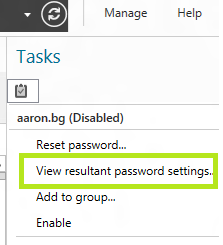
En el caso
de que por las membresías del objeto a este le apliquen varias políticas pues
la prioridad mencionada anteriormente decidirá cuales parámetros toman
precedencia.

Hasta pronto y gracias.
Subscribe to:
Posts (Atom)